
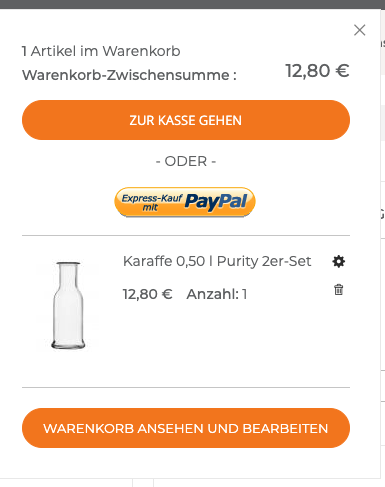
Die Aktivierung erfolgt unter Configuration>>Sales>>Payment Methods: “Configure” Paypal:
Voraussetzung: Paypal ist bereits angebunden (API); als Referenz einfach die Einstellungen von Stölzle übernehmen
Die Aktivierung des PaypaExpress Buttons erfolgt in den >> Advanced Settings:
>Display on Shopping Cart: yes
Damit wird der Paypal Express Button im Mini Warenkorb und im Warenkorb angezeigt. Der Kunde kann dann den Checkout direkt über Paypal vornehmen.
Nach Klick auf den Button wird der Kunde auf die Paypal Seite verlinkt und bestätigt dort wie gewohnt seine Daten. Er wird dann wieder zur Shopseite weitergeleitet und bestätigt dort den Kauf. Die Daten (Warenkorb; Rechnungs- & Lieferanschrift) werden automatisch von Paypal übergeben und auf der Bestätigungsseite dem Kunden angezeigt. Nach Bestätigung “Zahlungspflichtig bestellen” wird der Kauf abgeschlossen und die Bestellung übermittelt.
Workflow Paypal Express Checkout:
1
Customer Places Order
The customer taps the “Check out with PayPal” button.
2
Customer Is Redirected to PayPal Site
The customer is redirected to the PayPal site to complete the transaction.
3
Customer Logs into their PayPal Account
The customer must log in to their PayPal account to complete the transaction. The payment system uses the customer’s billing and shipping information from their PayPal account.
4
Customer Returns to the Checkout Page
The customer is redirected back to the checkout page in your store to review the order.
5
Customer Places Order
The customer places the order, and the order information is submitted to PayPal.
6
PayPal Settles the Transaction
PayPal receives the order and settles the transaction.